28. Exercise: Getting the Current Battery State
Getting the Current Battery State
As mentioned, our code currently contains a bug. Our app adds and removes the dynamic broadcast receiver in onResume and onPause. When the app is not visible, the plug's image will not update. This can lead to the plug sometimes having the incorrect image when the app starts.
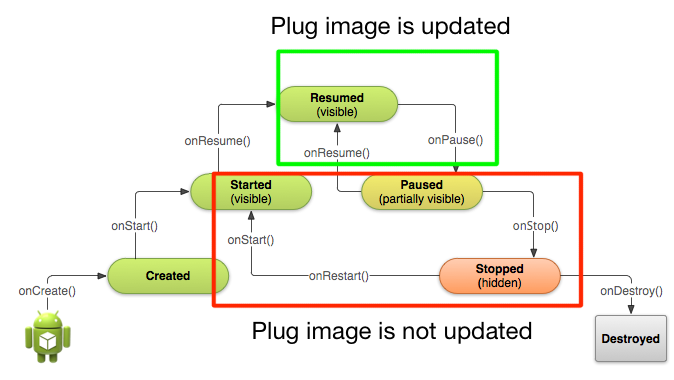
Now we could move the code to dynamically add and remove the broadcast receiver in different lifecycle methods, for example onCreate and onDestroy, but this would cause us to waste cycles swapping around an image which isn't even on screen. A better approach is to check what the current battery state is when the app resumes and update the image accordingly.
There are two ways to do this, depending on whether you're on API level 23+ or before.
Getting Charging State on API level 23+
To get the current state of the battery on API level 23+, simply use the battery manager system service:
BatteryManager batteryManager = (BatteryManager) getSystemService(BATTERY_SERVICE);
boolean isCharging = batteryManager.isCharging();
Getting Charging State with a Sticky Intent
Prior to Android 23+ you needed to use a sticky intent to get battery state. As we've seen, a normal, broadcasted intent will be broadcasted, possibly caught by an intent filter, and then disspear after it is processed. A sticky intent is a broadcast intent that sticks around, allowing your app to access it at any point and get information from the broadcasted intent. In Android, a sticky intent is where the current battery state is saved.
You don't need a broadcast receiver for a sticky intent, but you use similar looking code to registering a receiver:
IntentFilter ifilter = new IntentFilter(Intent.ACTION_BATTERY_CHANGED);
Intent batteryStatus = context.registerReceiver(null, ifilter);
Notice how registerReceiver is used, but instead of passing in a broadcast receiver, null is passed. The intent filter here is the intent filter for the sticky intent Intent.ACTION_BATTERY_CHANGED. The registerReceiver method will return an intent, and it is that intent which has all of the battery information, which you can use:
boolean isCharging = status == BatteryManager.BATTERY_STATUS_CHARGING || status == BatteryManager.BATTERY_STATUS_FULL;For more information on how to getting information about the battery, check out the Monitoring the Battery Level and Charging State documentation.
Now that you know how to get battery state, you should be able to complete the following exercise and fix the bug. The code is below.
Note: If you need to check whether the user is on API 23+, you can use the following code:
if (Build.VERSION.SDK_INT >= Build.VERSION_CODES.M)Exercise Code
SOLUTION:
- If the user is on an API 23+ device, use the BatteryManager's `isCharging` method and update the plug image
- For older phones, use the `Intent.ACTION_BATTERY_CHANGED` sticky intent to get the charging status and update the plug image